

FAQ
Is Kaleidoscope Park free?
Yes, Kaleidoscope Park’s activities are free and open to the public.
When is Kaleidoscope Park open?
Kaleidoscope Park is open daily from 6 a.m. to 11 p.m.
Where is Kaleidoscope Park located?
Kaleidoscope Park is located at 6635 Warren Parkway, Frisco, TX, 75034.
Where is parking for Kaleidoscope Park?
Parking for Kaleidoscope Park is now available in the garage at 6605 Warren Pkwy, near HALL Park Hotel. The first two hours are complimentary. Parking rates for additional time: 3 hours - $2.00, 4 hours - $4.00, 5 hours - $6.00, 6 hours- $8.00, 7+ hours - $10.00.
Additionally, self-parking is available in the lots surrounding Kaleidoscope Park, and there are a limited number of first-come, first-served parallel parking spots available on Park Avenue. Please note that parking in front of nearby HALL Park tenant buildings is permitted only on weekends.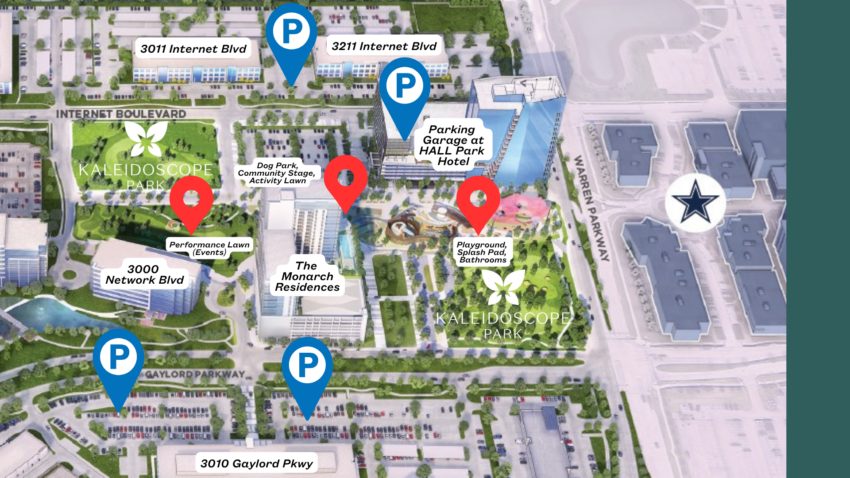
Where can I find handicap-accessible parking?
Visitors who need handicap-accessible parking may use any available space in the lots surrounding Kaleidoscope Park. Additional handicap-accessible parking can be found in the parking garage at 6605 Warren Pkwy.
All open handicap-accessible spots in the surrounding area are available for Park guests to use.
Looking ahead, Phase 2 of the park will include a dedicated parking garage for Kaleidoscope Park visitors, which will feature additional handicap-accessible parking spaces for added convenience.
What are Kaleidoscope Park's rules?
Kaleidoscope Park is a nonprofit community space supported by individual donors, corporate partners, and friends who believe in our mission to bring people together through nature, art, and shared experiences. The Park welcomes our local community and visitors from near and far to enjoy a place unlike any other. To help keep Kaleidoscope Park safe and enjoyable for everyone:
- Please be respectful of fellow visitors
- Dogs are welcome and must remain on a leash at all times
- No open flames, fires, or barbecue grills
- Kaleidoscope Park is a smoke-free environment
For the safety of all guests, the Park is monitored by 24-hour surveillance. Thank you for helping care for Kaleidoscope Park and for being part of our community.
Is there security at Kaleidoscope Park?
Yes, full-time public safety officers monitor Kaleidoscope Park around the clock. Additionally, the Park is always well-lit and we have cameras recording 24/7.
Are there restrooms at Kaleidoscope Park?
Yes, Kaleidoscope Park has two centrally located restrooms. One is inside the fenced Children’s Play Area, and the other is outside the Play Area. The restrooms are open daily from 9 a.m. to 8 p.m.
Is there a Lost & Found at Kaleidoscope Park?
For lost items, please contact us at 214.346.5531 or info@kaleidoscopepark.org.
Is Kaleidoscope Park wheelchair accessible?
Yes, Kaleidoscope Park was thoughtfully designed for visitors of all ages and abilities to enjoy.
Where can I eat at Kaleidoscope Park?
Kaleidoscope Park offers pop-up food and beverage options on select days, such as food trucks and an Airstream food cart. Check the Kaleidoscope website and social media for dining updates. Additionally, Palato Italian Kitchen and Lounge, an upscale, exhibition-style kitchen restaurant located in the nearby HALL Park Hotel, as well as their Airstream near the stage in the Park. https://www.palatofrisco.com/menus/parkside
How is Kaleidoscope Park run?
The Kaleidoscope Park Foundation, a 501(c)3 nonprofit manages operations, public programming, and ongoing maintenance with financial support from donors, earned revenue, and investments.
Kaleidoscope Park is made possible through a public-private partnership with the City of Frisco, Communities Foundation of Texas, and HALL Group.
What is the walking distance around Kaleidoscope Park?
The distance around Kaleidoscope Park is approximately half a mile.
Can I host an event at Kaleidoscope Park?
Yes! We have multiple spaces for events and rentals are open to individuals, companies, and organizations. If you'd like to host a private or public event, please email mmelancon@kaleidoscopepark.org
Who pays to operate Kaleidoscope Park?
Kaleidoscope Park Foundation is a nonprofit, charitable organization. All Park programs and operations are made fully possible by donations from individuals, corporations, and foundations.
Does the "Butterfly Rest Stop" sculpture cause injury to birds or wildlife?
Janet Echelman and her team have have collaborated for years with a bio-engineering firm and to ensure that her structures and its materials do not endanger birds or other wildlife. The use of thicker ropes combined with netting composed of soft twines that move in the wind and are clearly visible to birds. For example, it is a common practice among outdoor seafood restaurants that wish to keep birds away to suspend kite tails that move in the wind to capture birds' attention and alert them and divert their flight path. Her structures have a track record on five continents, and in more than twenty years there have been no documented examples of her sculpture causing injury to birds or wildlife.
How do I add park events to my calendar?
There are two ways:
- Subscribe to all events (recommended): on the Events page, choose Apple, Google or Outlook (or Click Here for Step By Step Instruction) and follow the steps for your calendar. Your calendar then stays up to date on its own: new events appear, and changes and cancellations update automatically.
- Add one event: on any event page, choose Add to calendar, pick your calendar app and choose Add just this event. This adds a one-time copy, which won’t change if the event is later moved or cancelled.
How do I subscribe to the park calendar in Apple Calendar (iPhone, iPad or Mac)?
- On the Events page, choose Apple, then Subscribe in Apple Calendar.
- Your Calendar app opens and asks to subscribe. Choose Subscribe.
- On iPhone or iPad, tap Add. On a Mac, set Auto-refresh to Every hour and click OK.
Apple Calendar checks for changes every few hours. On iPhone, it’s listed under Settings → Calendar → Accounts → Subscribed Calendars, where you can also remove it.
How do I subscribe to the park calendar in Google Calendar?
- On the Events page, choose Google, then Subscribe in Google Calendar. This works best on a computer.
- Sign in if asked, then click Add.
- It also shows up in the Google Calendar app on your phone. If it doesn’t, open the app’s Settings, tap the Kaleidoscope Park calendar and turn on Sync.
Google checks for changes every 12 to 24 hours, so updates can take up to a day to appear.
How do I subscribe to the park calendar in Outlook?
On the Events page, choose Outlook, then pick your account type:
- Personal (Outlook.com, Hotmail, Live): choose Subscribe in Outlook, sign in if asked, check the name and click Import.
- Work or school (Microsoft 365): copy the calendar link, open Outlook on the web → Add calendar, choose Subscribe from web, paste the link, name it “Kaleidoscope Park” and click Import. It then appears in the Outlook app too.
- Classic Outlook for Windows: in Calendar, choose Add Calendar → From Internet, and paste the link.
- Outlook for Mac: subscribe in Outlook on the web; it syncs to the Mac app.
Don’t download the calendar file and import it, because that makes a copy that never updates. Outlook can take up to a day to show changes, and there’s no refresh button.
I subscribed to the park calendar, but an event or a change isn’t showing. Why?
Calendar apps check for updates on their own schedule, and we can’t make them refresh sooner. Apple Calendar usually checks every few hours. Google Calendar can take 12 to 24 hours, and Outlook can take up to a day. The event page on our website is always current.
If it’s still missing after a day:
- Make sure you subscribed rather than downloading the calendar file or using “Import” or “Upload from file”. An imported copy never updates.
- On a phone with Google Calendar, check that Sync is on for the Kaleidoscope Park calendar in the app’s Settings.
- Remove the Kaleidoscope Park calendar from your app and subscribe again from the Events page, following the steps for your calendar.
Events that happen on several dates, such as markets and concert series, show up as a separate entry for each date.
A repeating event is still in my calendar after it ended or was cancelled. How do I fix it?
If you subscribed, the extra dates disappear the next time your calendar app checks for updates. That can take up to a day in Google Calendar or Outlook.
If you added the event with Add to calendar → Add just this event, it’s a copy that doesn’t update, so delete it from your calendar. To get changes and cancellations automatically, subscribe on the Events page instead.
Still seeing old dates after a day? Remove the Kaleidoscope Park calendar and subscribe again.